Soup Raiders Goes Native: Porting the demo from Unity
A port is not simply “the same game in another engine” or “just an emulator”. It is a long series of decisions about what to do with the original content (art, code and audio) to create a new version with its own set of constraints. In this blog post, I will look at three different approaches to porting, then show what I exported from my old Unity demo and how. The next blog post will cover how I imported those assets into my own game engine.
Porting games
You might have heard terms such as remaster, remake or even recompilation. Their meanings can be confusing, and there are nearly as many approaches to porting as there are game ports. Here are three concrete examples and how I personally classify them.
Demon’s Souls PS5 (2020)
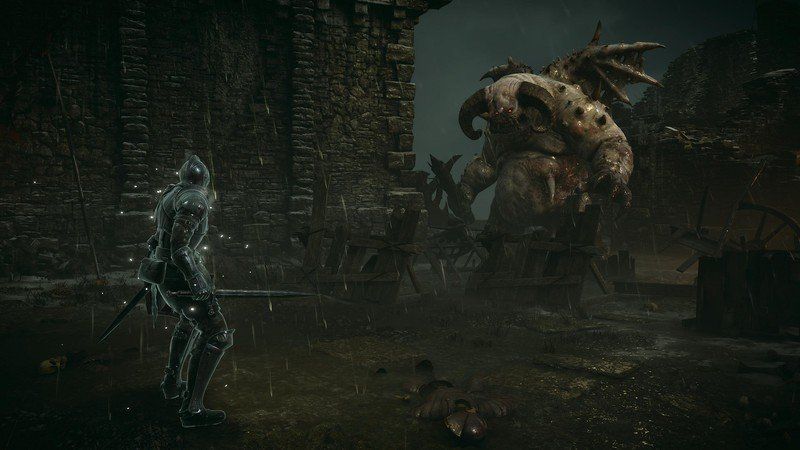
For the release of the PS5, Bluepoint Games, with Japan Studio, remade FromSoftware’s PS3 game Demon’s Souls. There is a very good /noclip documentary1 on the subject, featuring interviews with the team behind the game. In a Digital Foundry interview2, the developers at Bluepoint described the port as using two engines. Based on their explanation, I understand the architecture roughly as follows:
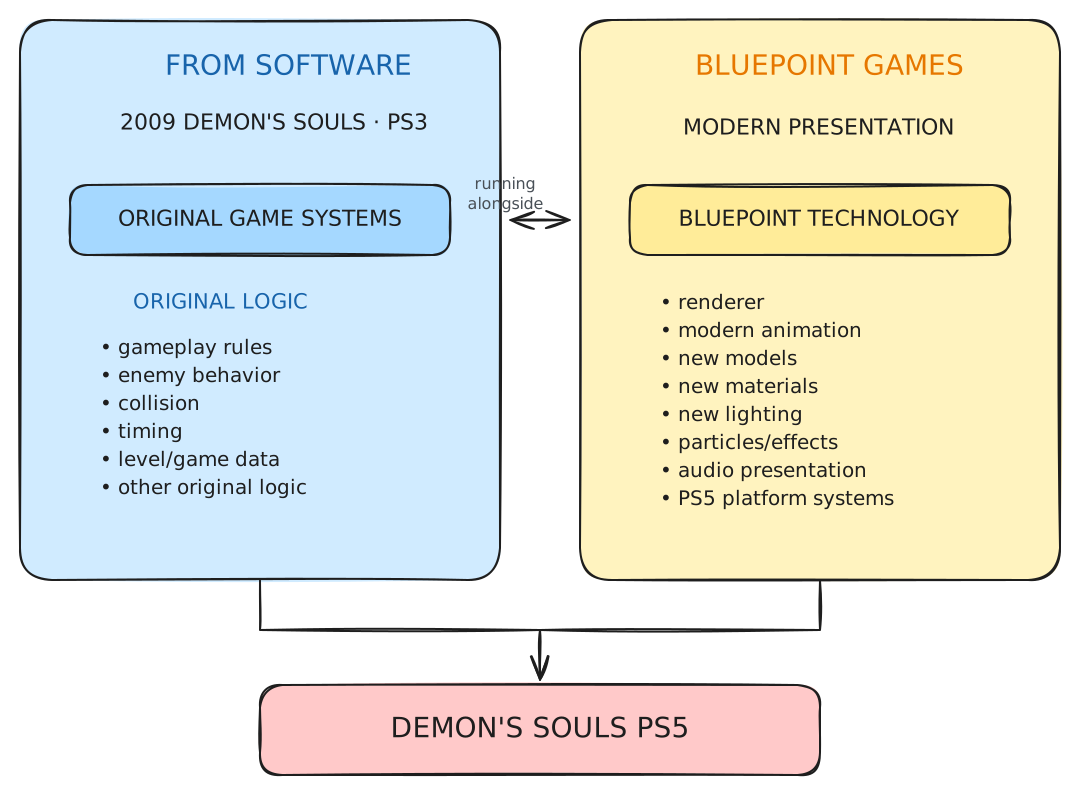
This allows the PS5 game to look radically different while its combat feels extraordinarily close to that of the PS3 game. Visually, an enormous amount was rebuilt. On the technical side, Marco Thrush, Bluepoint’s president and an engineer, described starting by compiling the codebase one error at a time, then running the game and fixing one crash at a time. The team did not simply recompile the old code: they also introduced modernised character creation, a photo mode, the mirrored Fractured World, quality-of-life adjustments, much faster loading, updated controls and other changes. Given the amount of work involved, I would classify Demon’s Souls on PS5 as a remake.
Metal Wolf Chaos XD
Metal Wolf Chaos is a hilarious game by FromSoftware, released for the original Xbox only in Japan in December 2004. The player takes the role of the president of the United States, piloting a mech. You can watch a speedrun from SGDQ 20143, with commentary explaining the gameplay. Funnily enough, Devolver unexpectedly offered to work with FromSoftware to rerelease the game:
Count us in to help Metal Wolf Chaos get out to more gamers if From Software wants some help. #FreeMetalWolf pic.twitter.com/867qay70j8
— Devolver Digital (@devolverdigital) January 27, 2016
And it actually worked!4 A General Arcade team consisting of five software engineers, two QA engineers, a producer, an artist and two 3D modellers spent sixteen months on the project, according to its project page5. They used a modified version of Sony’s PhyreEngine, C++ and FMOD, with Direct3D 11 on Xbox One and GNM on PlayStation 4.
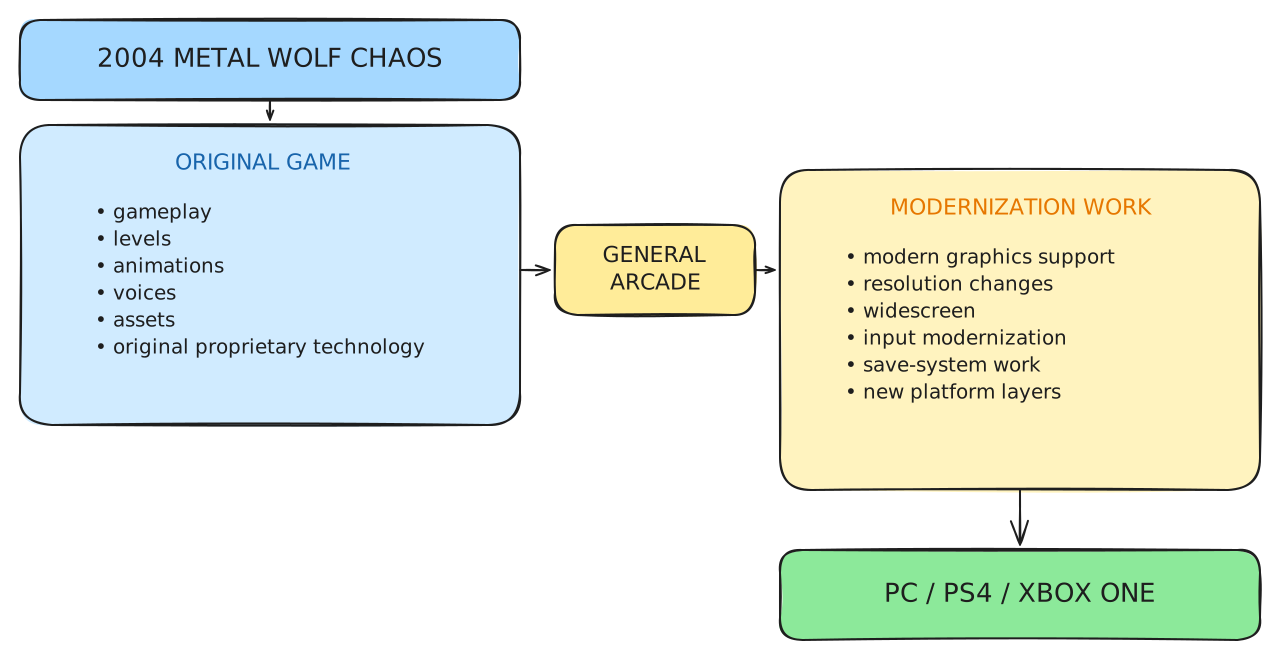
Because General Arcade describes the project as a modernisation of the original game—upgrading its presentation, controls and platform support rather than rebuilding it as a new game—I would classify Metal Wolf Chaos XD as a remaster, not a remake.
Dusklight
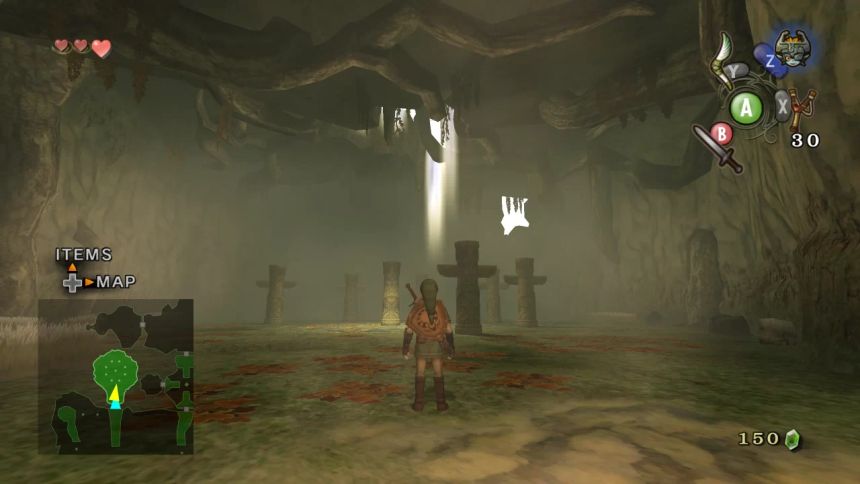
I got a GameCube at the end of its life (you can call me a patient gamer), and one of my favourite games on it—and in general—is The Legend of Zelda: Twilight Princess. Fast-forward a few years and I discovered that the community had created a native version of the game. It was released under the name Dusk in May 2026 and is now called Dusklight6.
For Dusklight to exist, another project first had to decompile the original Twilight Princess. This project is ZeldaRET/tp7. Its goal is not merely to write code that behaves similarly, but to produce C/C++ code that compiles to the same machine instructions as the original executable.
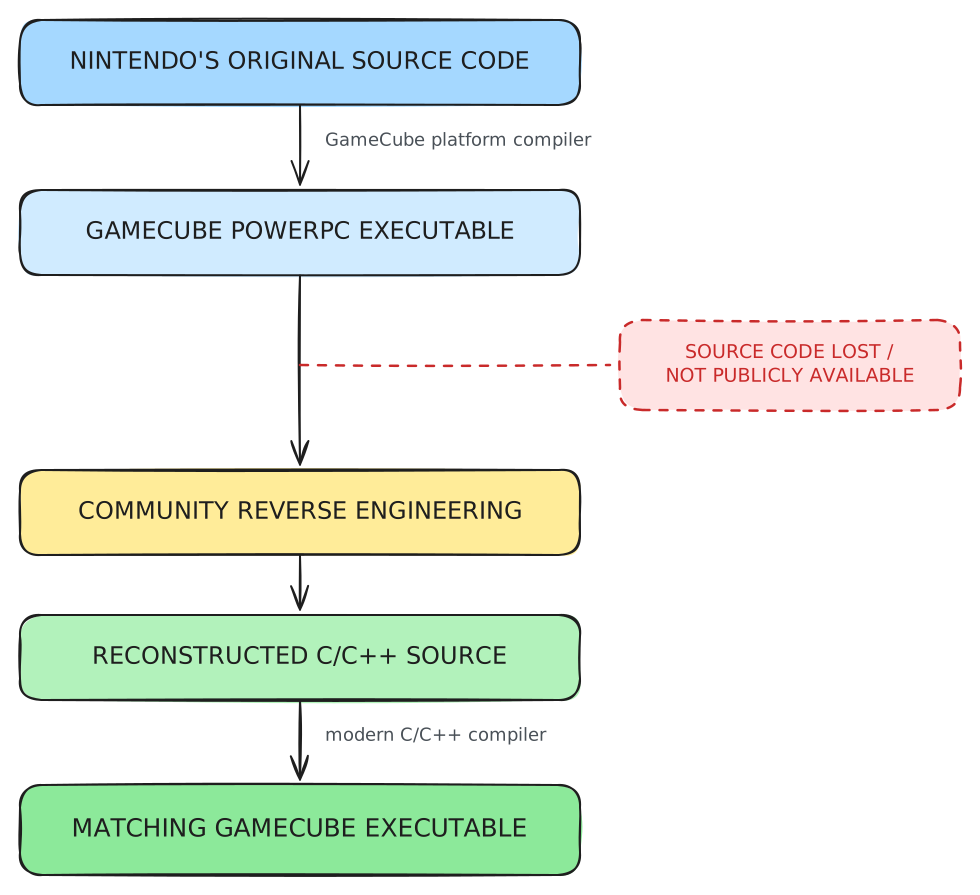
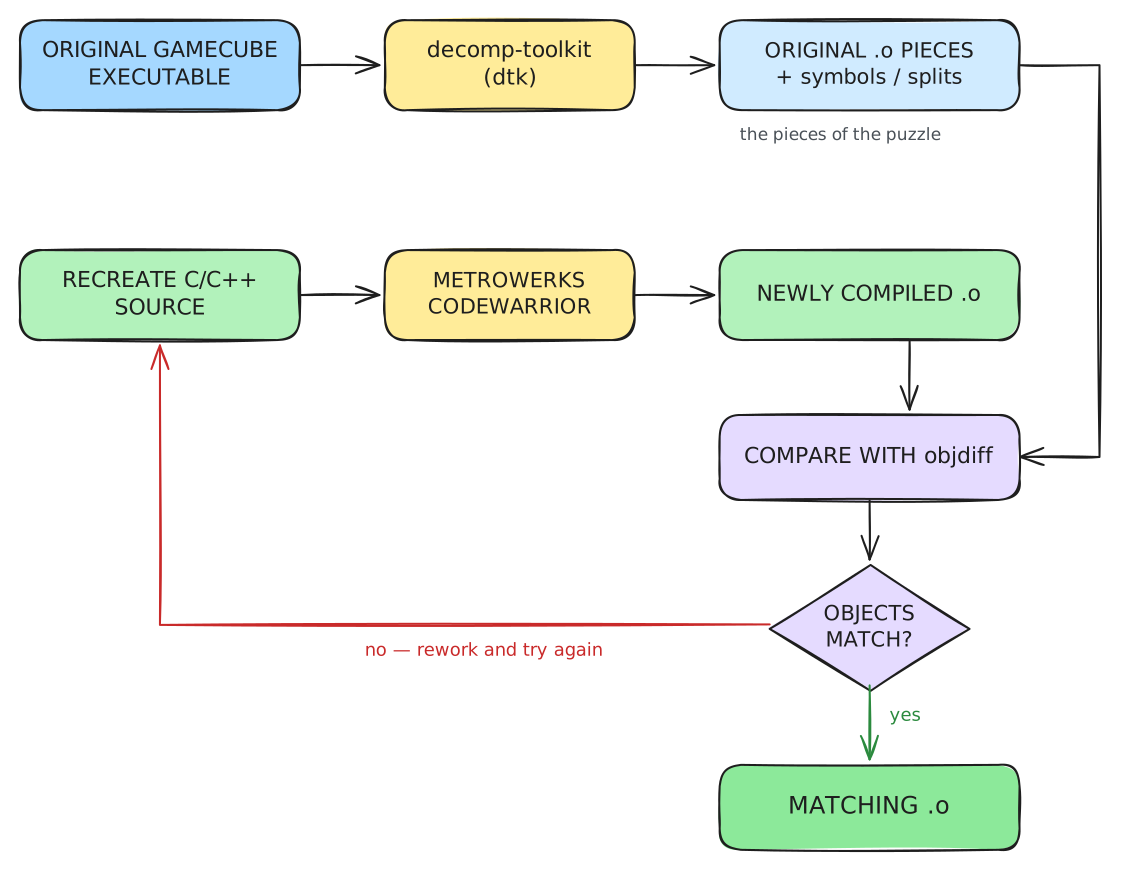
To reverse-engineer the PowerPC executable, they used decomp-toolkit (or dtk)8. This tool analyses the original GameCube/Wii executable, discovers functions, splits the binary into relocatable objects and generates linker information, symbols and splits. This provides the pieces of the “puzzle” that contributors need to recreate the game. For each piece—a compiled .o file—they recreate the C/C++ equivalent, then compile it using the Metrowerks CodeWarrior compilers and linkers used by Nintendo at the time. They compare the newly generated PowerPC .o with the original using objdiff9, then repeat the process until the two match.
ZeldaRET is not itself a PC port, but Dusklight builds upon its work. Dusklight uses Aurora10, a source-level GameCube and Wii compatibility layer, to link the game-derived code, including Nintendo’s JSystem code. This greatly simplifies the recompilation work because the developers do not need to refactor every call to the original GameCube APIs. Aurora uses SDL3 for its application layer and input, while its GX graphics compatibility layer is built on WebGPU. I also use SDL3 in the Soup Raiders native port. In the end, the architecture of Dusklight looks like this:
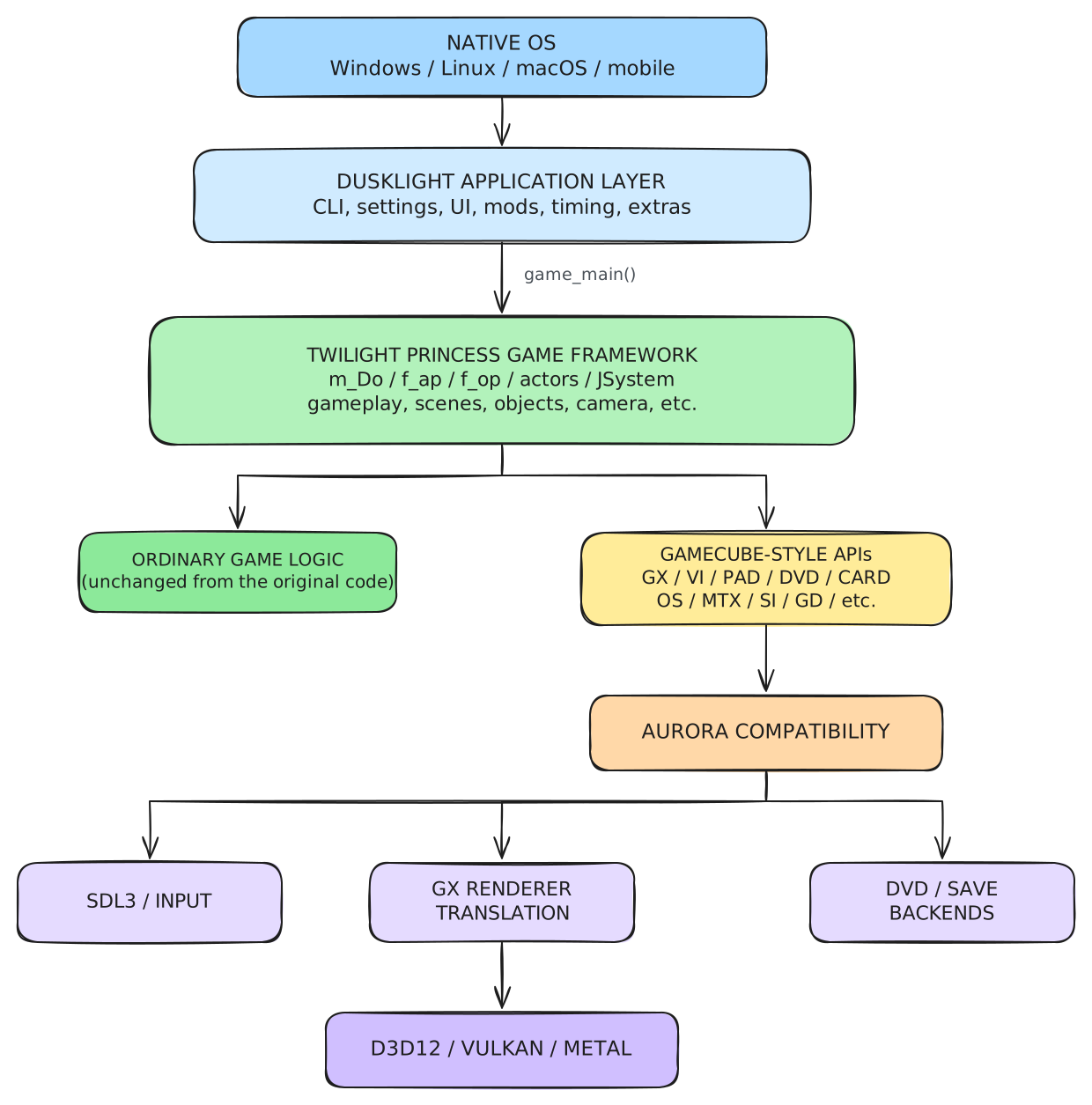
Because it turns matching decompiled source code into a native application for modern platforms, I would classify Dusklight as a recompilation.
And Soup Raiders?
I started working on Soup Raiders with Unity 2017.4.1f1 in July 2018. I remember it well because we were developing a demo to submit to Pro Helvetia (the Swiss Arts Council) in the hope of securing funding to begin production. At the time, the game looked like this:
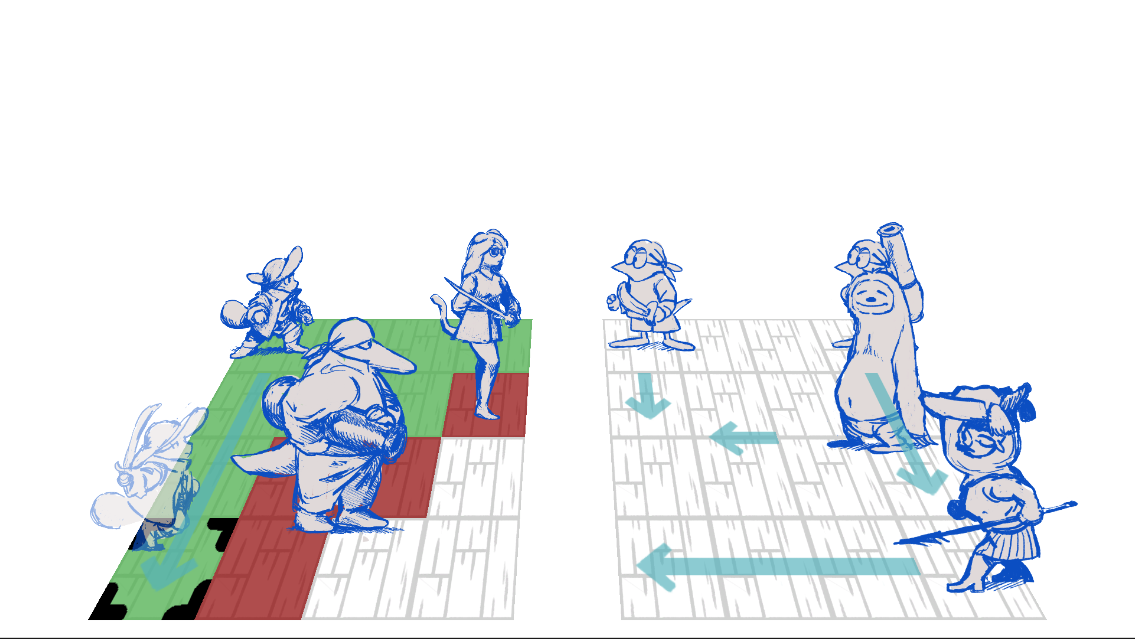
And I looked like this:

After cancelling the project in mid-2019, I restarted it in March 2020, just as the COVID pandemic hit Europe. A new prototype began to take shape and looked like this:
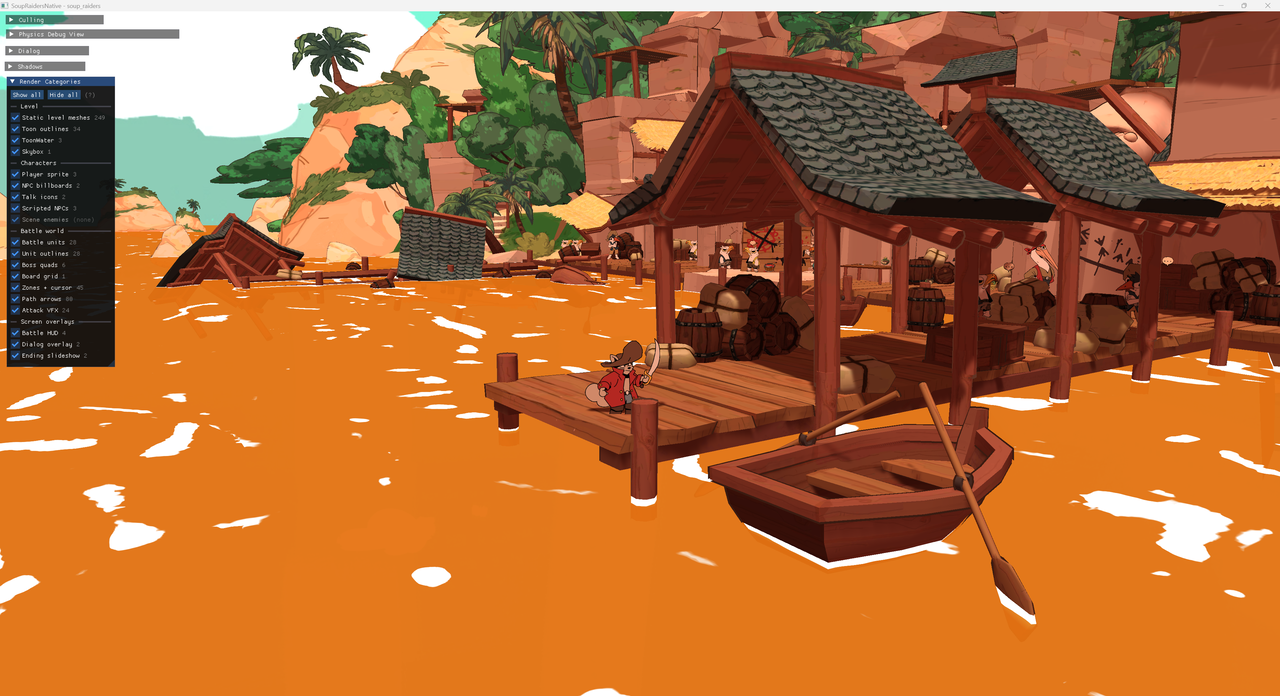
The latest vertical slice, which is playable on itch.io, ran on Unity 2022.3.2f1 and featured three levels with three fights, one mini-boss and one boss. This is the view from the beginning of the demo, in the docks of the Red Island:
Many things need to be migrated to my custom engine to reproduce this view, and each component of the demo has its own requirements. Let’s explore the different parts of this porting process. This blog post covers what I export from Unity; the next will cover how I import it into my game engine.
The audio
This is the easiest part of the game to port. In Unity, I used FMOD, middleware that allows a sound designer to add events in the FMOD editor and generate banks for the game to import.
Fortunately, FMOD is not limited to Unity and provides native libraries for PC and Nintendo Switch, as well as other modern platforms such as PS4, PS5 and even HTML5. Porting the audio therefore meant copying the banks and statically linking the libraries provided by FMOD.
3D models
Julie Baechtold did incredible work on Soup Raiders. She created the 3D models in Blender, then placed them in Unity to create the levels. As she was not familiar with git, I created a tool that exported her Unity scene and all its dependencies so that I could import them into my Unity project.
There are several ways to export those models and the layout that Julie created in Unity:
- Use Unity’s FBX Exporter package.
- Use Blender as the asset source (exported as
.glb) and Unity for level composition. - Parse the
.unityYAML file in my engine. - Build a custom Unity scene exporter that generates glTF 2.0
.glbfiles.
I went with solution 4. The Unity Editor script ExportLevelGeometry.cs generates a GLB file for the entire level. A GLB file contains two main parts:
- A JSON part describing the glTF asset, scenes, nodes, meshes, accessors, buffers and buffer views.
- A binary part containing the mesh positions, UV coordinates and indices.
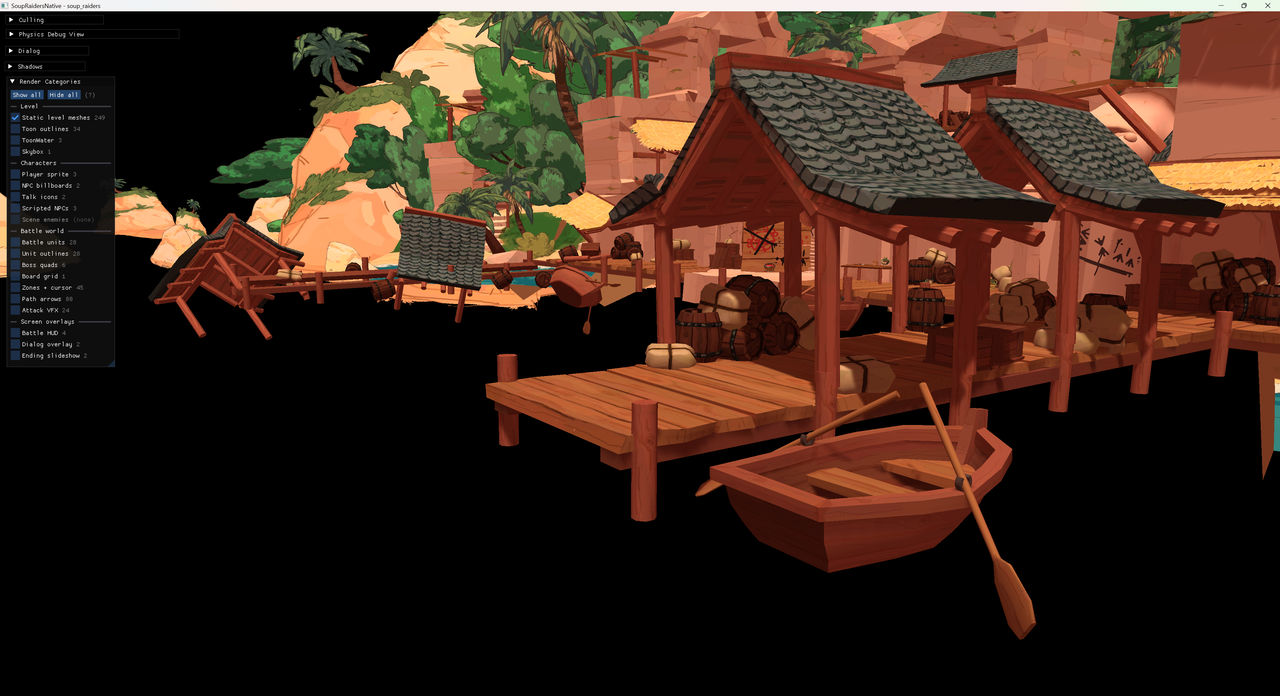
Meanwhile, another script, ExportLevelRenderers.cs, exports the materials linked to the renderers—in short, their visibility, textures and related data. These are exported to a simple .json file that references each texture that must also be exported. I use Unity’s GlobalObjectId to match each renderer across the two exports. This allows me to export all the static meshes, including static sprites:
The renderers JSON looks like this:
{
  "version": 6,
  "coordinateSpace": "native_render_x_flipped_from_unity",
  "renderers": [
    {
      "name": "LevelDocks/DOCKS-DETAILS/barrel",
      "id": "GlobalObjectId_V1-2-88d0b98e1cbd76d418edf891b923eadb-
          16941762359777390037-2086583302",
      "type": "MeshRenderer",
      "active": true,
      "position": [-46.179996490478519, -10.490001678466797, -112.6961898803711],
      "center": [-46.16727066040039, -10.471028327941895, -112.69300842285156],
      "materials": [
        {
          "name": "barrel",
          "guid": "bd4b0fa6863613a48b2d6fc9d4a12681",
          "assetPath": "Assets/Materials/Red Island/Props/barrel.mat",
          "mainTexture": "Assets/Textures/Red Island/Docks/barrel.jpg",
          "renderType": "Opaque",
          "shader": "Custom/Toon Shading",
          "alphaCutoff": 0.5,
          "textureScale": [1.0, 1.0],
          "textureOffset": [0.0, 0.0],
          "outlineColor": [0.22745098173618318, 0.10588235408067703,
              0.06666667014360428, 0.5],
          "outlineWidth": 0.019999999552965165,
          "outlineAngle": 89.0
        }
      ],
      "articulated": "",
      "lookAtCamera": ""
    }
  ]
}
A little note on native_render_x_flipped_from_unity, it just means that positions go (x,y,z) → (-x,y,z) and Euler angles (x,y,z) → (x,-y,-z). I will talk about outlines in a following blog post on the renderer.
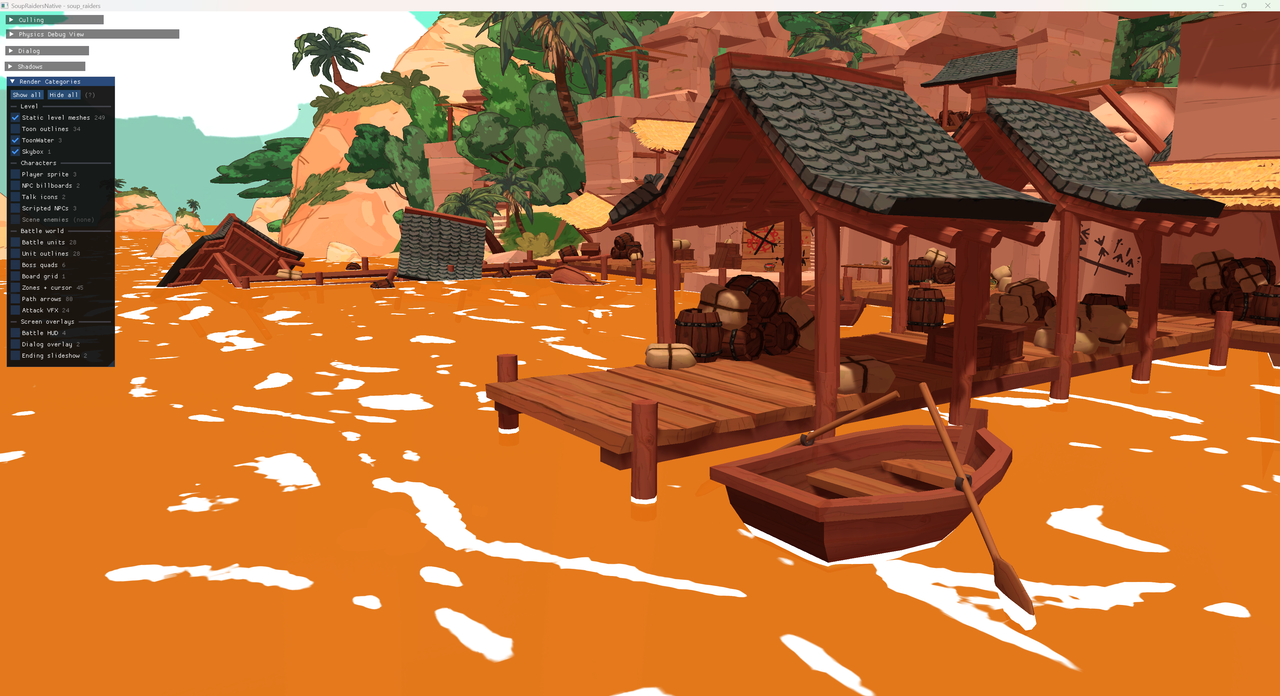
However, the brownish water of the Soup is missing! This mesh is a little unusual. It was not created in Blender, but directly in Unity, and uses a specific ToonWater shader rather than a more standard shader like the rest of the static level. It is actually just four quads. Its geometry is also exported by ExportLevelGeometry.cs, because I want to preserve the Unity geometry, but it goes through ExportDocksWater() to generate water_geometry.glb and water_instances.json. Here it is:
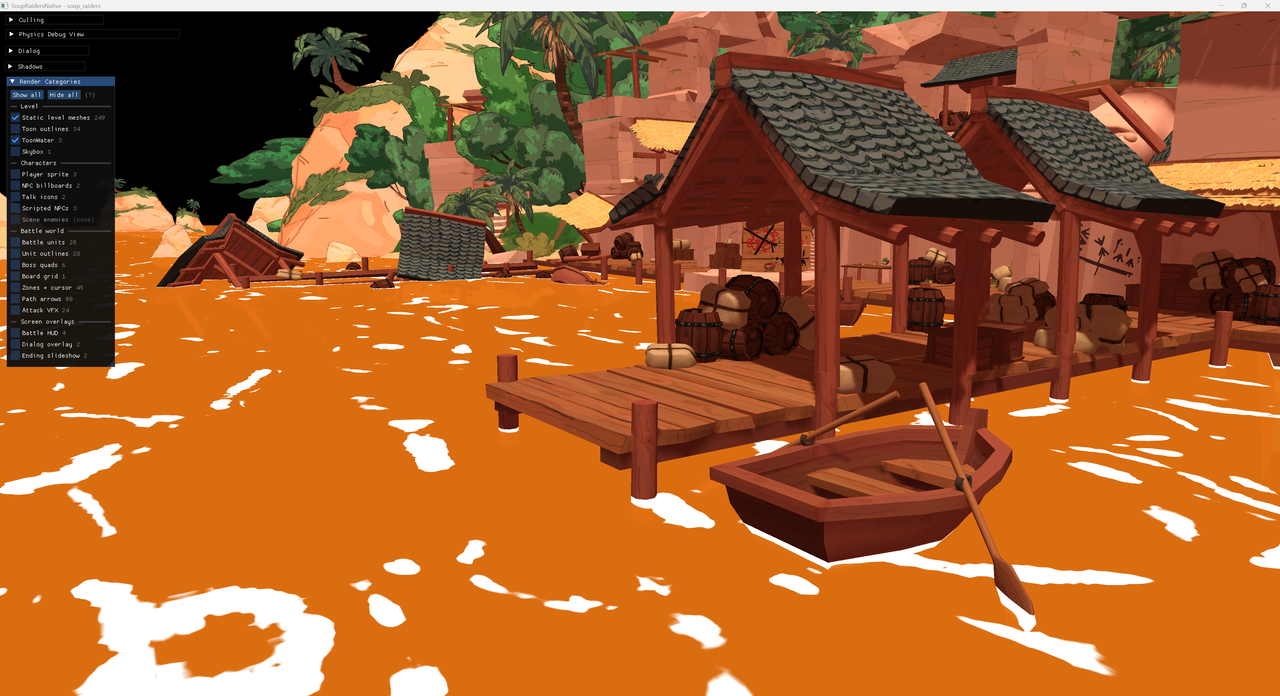 Without water
With water
Without water
With water
Colliders
Visuals are nice, but my main character needs something to walk on. In the Unity demo, I spent a lot of time adjusting each level’s physics shapes to ensure that the main character did not fall through the ground or get stuck in a wall or on the stairs. To reproduce this behaviour in my engine, I also needed to export the colliders. The ExportLevelCoilliders.cs script exports the following shapes:
- Box colliders: emitted as hulls (eight world-space corners).
- Convex mesh colliders: hulls (world-space vertices).
- Non-convex mesh colliders: meshes (vertices and triangles).
- Sphere colliders.
- Capsule colliders.
In addition to the collider geometry, I add the surface type from the GameObject tag: Wood becomes 1, Stairs becomes 2, and so on. The main character’s footsteps differ depending on whether they step on wood or stone. The exporter also excludes specific objects such as moving characters: Dorothy has a collider, but it is not static. In the end, the exported colliders look like this:
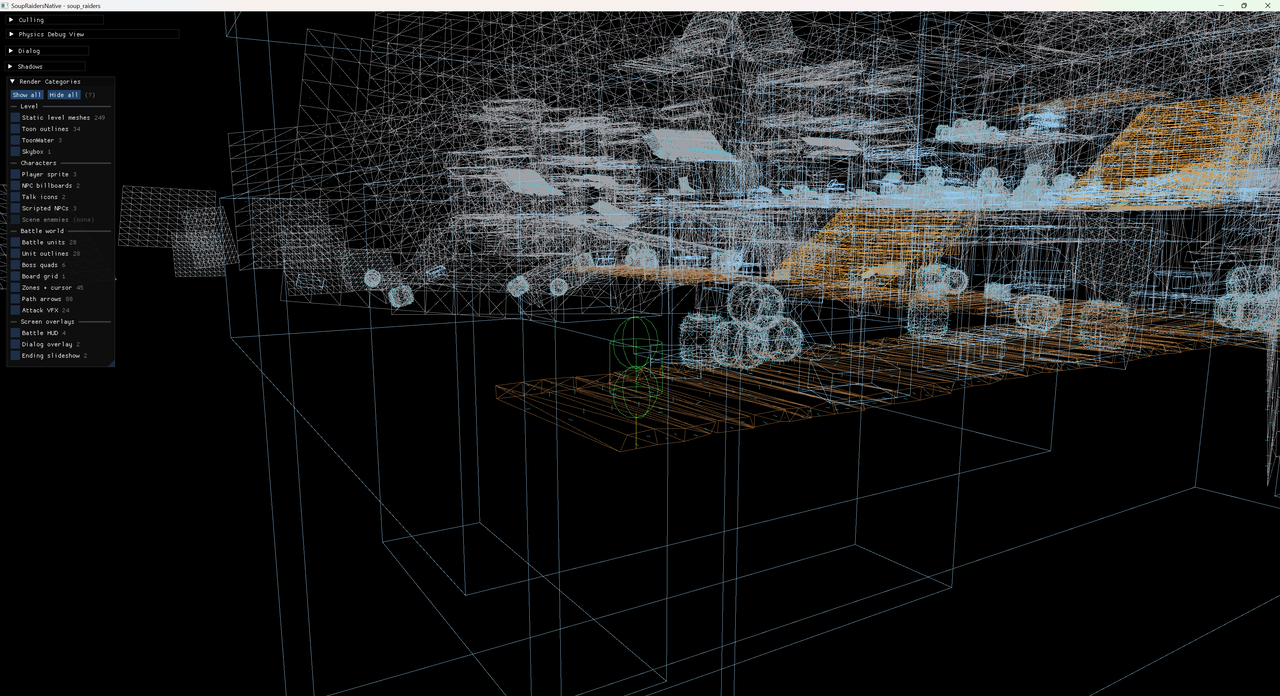
Here is how the collider JSON looks like:
{
  "version": 3,
  "coordinateSpace": "native_render_x_flipped_from_unity",
  "shapes": [
    {
      "type": "hull",
      "materialIndex": 1,
      "points": [
        31.5793, 7.09921, 6.9241,
        31.5299, 9.76265, 2.54655,
        37.85232, 7.13064, 6.87243,
        37.80292, 9.79409, 2.49488,
        31.5793, 7.43721, 7.12975,
        31.5299, 10.10066, 2.7522,
        37.85232, 7.46865, 7.07808,
        37.80292, 10.13209, 2.70054
      ]
    }
  ]
}
typeis one of the box3d shapes that matches the Unity collider
Billboards
Much of Soup Raiders’ charm comes from its animated 2D characters. The main characters were animated by Camille Bovey, while Julie added many seagulls to the levels. They behave like billboards, always facing the camera. The textures were already available for export, but, as with the level’s meshes, I also needed to export the placement of the billboards. This is the job of ExportLevelBillboards.cs, which exports their world position, lossy world scale, flipX value, texture, pixel rectangle, pivot in pixels (where the character’s feet are) and pixels per unit. It also exports the single-frame talk icons used by talkative characters. This is what the billboard JSON looks like in the end:
{
  "version": 2,
  "coordinateSpace": "native_render_x_flipped_from_unity",
  "billboards": [
    {
      "name": "Seagull Talk (1)",
      "position": [-10.2153, 6.30011, -41.96577],
      "parentName": "StaticCharacter_Seagull_05 (5)",
      "parentPosition": [-11.19866, 2.86357, -45.25861],
      "parentOffset": [0, 4.86, 0],
      "scale": [0.3, 0.3],
      "flipX": false,
      "texture": "Assets/Sprites/UI/Level/talk.PNG",
      "rect": [0, 0, 512, 512],
      "pivotPx": [256, 256],
      "pixelsPerUnit": 100
    }
  ]
}
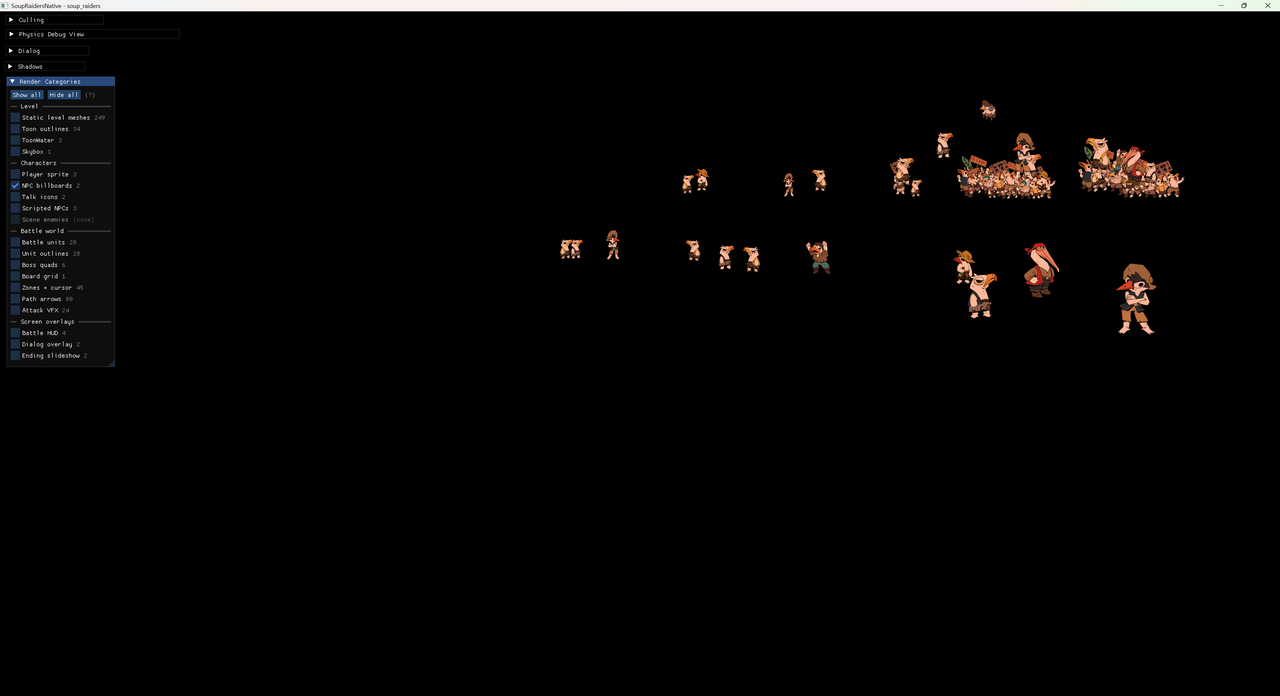
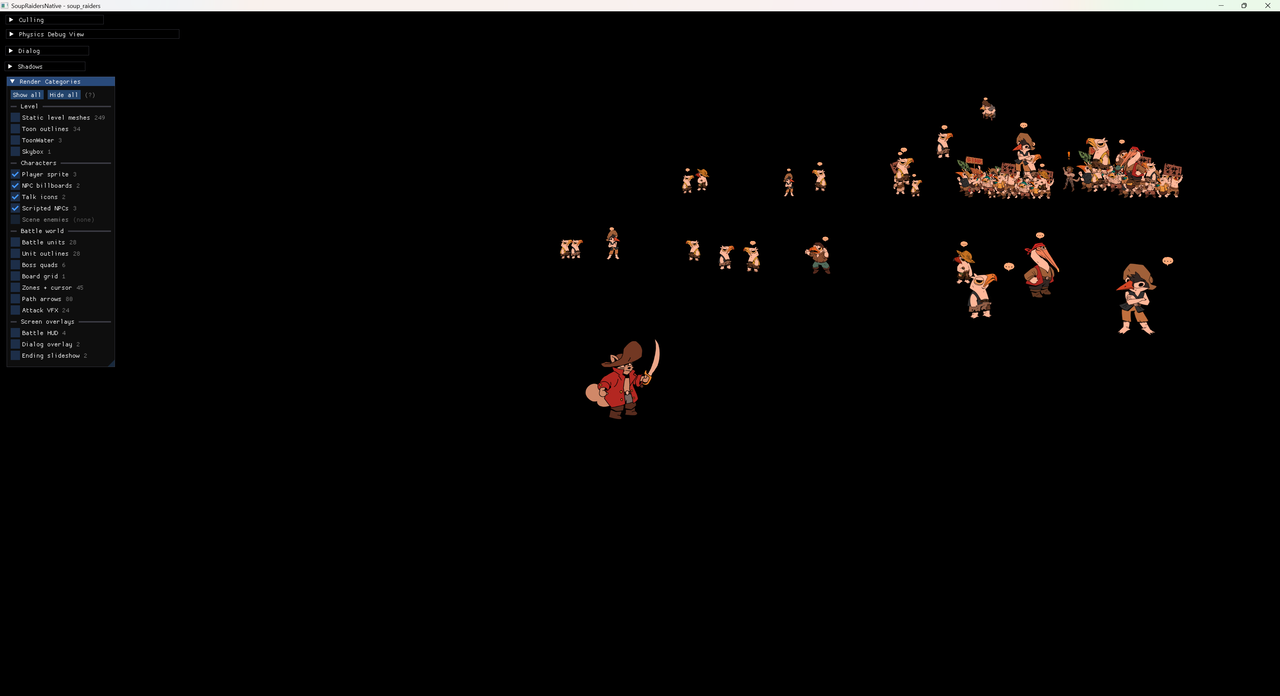
Two characters are missing:
- The player-controlled character.
- Dorothy, who moves during cinematics.
With them, the world is more crowded:
The final detail in this section is animation. Because my Animator clips simply switched sprites at specific frames, their animations were straightforward to export by reading the Unity YAML. Here is what an animation looks like in YAML:
--- !u!74 &7400000
AnimationClip:
  m_Name: WalkSide
  m_SampleRate: 12
  m_PPtrCurves:
  - curve:
    - time: 0
      value: {fileID: 21300000, guid: 3f2a..., type: 3}
    - time: 0.0833333
      value: {fileID: 21300000, guid: 9c41..., type: 3}
    attribute: sprite
    path:
  m_Events:
  - time: 0.25
    functionName: ManageAnimEvent
    intParameter: 1
  m_AnimationClipSettings:
    m_StopTime: 0.5
    m_LoopTime: 1
Although m_PPtrCurves looks like a barbaric name, it contains the times at which the animation changes from one image to another.
Skybox
As the skybox already consists of six textures, it does not need a Unity-side export. I will cover its import into my engine in more detail in the next blog post. Of course, the level looks better with it:
 Without skybox
With skybox
Without skybox
With skybox
Snap rails
In Soup Raiders, players do not control the camera. Instead of using Cinemachine—I tend not to use every Unity tool when I can implement something myself—I created a system that interpolates between snap points. Each point stores the camera position and direction, as well as the character position. It also stores the character’s Euler angles, but I do not export them. This allows the camera to move around while following the player. The snap points are exported as-is to a .json file that looks like this:
{
  "version": 1,
  "coordinateSpace": "native_render_x_flipped_from_unity",
  "snapshots": [
    {
      "cameraPos": [-52.23652, -2.154821, -132.7845],
      "cameraAngles": [35.454903, 2.0682678, 0.00016311444],
      "characterPos": [-51.905075, -8.694596, -117.0]
    },
    {
      "cameraPos": [-82.17407, -3.3850465, -141.92406],
      "cameraAngles": [9.106377, 58.706604, 0.0001880661],
      "characterPos": [-51.903656, -9.063084, -123.52415]
    }
  ],
  "transitions": [
    {
      "a": 0,
      "b": 36,
      "radius": 5.0
    }
  ]
}
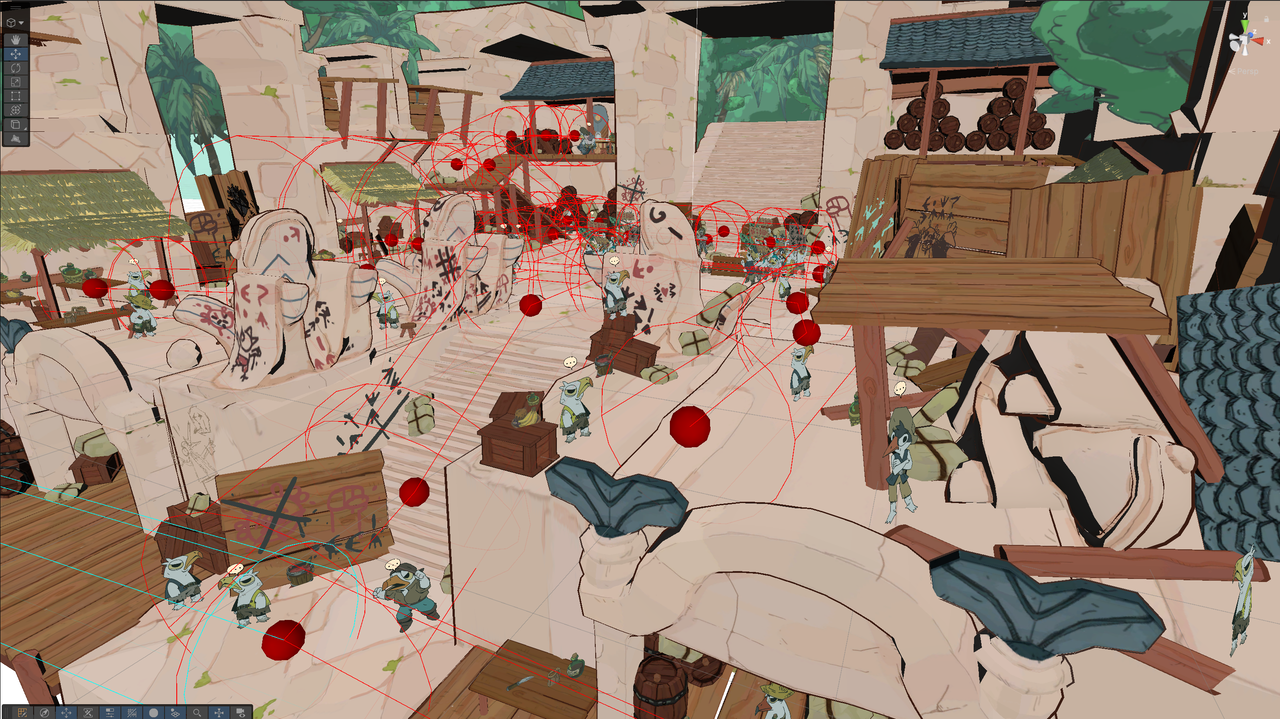
I had a Play Mode snapshot-recording system that let me move through the level with a free-orbit camera, find a good viewpoint and save the snapshot. The snap system would then connect the nearest points when an unobstructed raycast existed between them. This is what it looks like in Unity, with red spheres representing the snap points and red lines representing the connections between them:
Source code
The Unity demo contains 174 C# files with 18,421 lines of code. While not enormous, it is still a substantial body of code to migrate to C++. One example of a C#-to-C++ migration is the PS Vita port of Bastion:
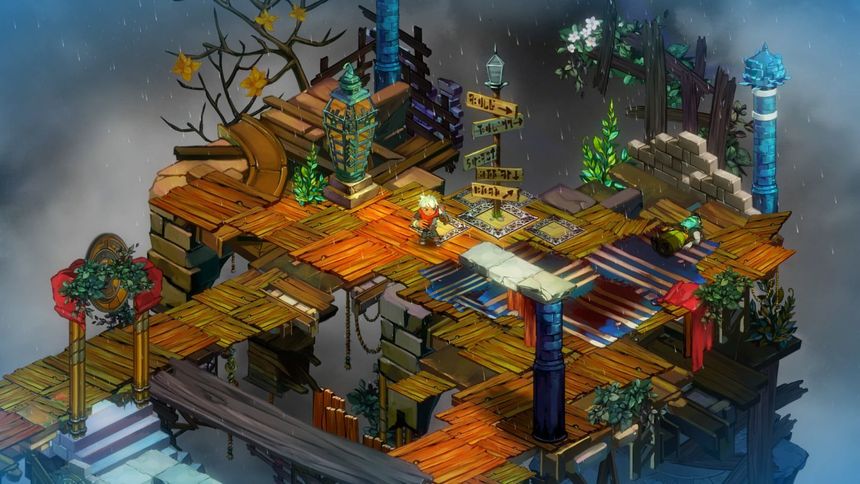
Bastion was built with XNA, .NET and C#. After porting FEZ to PlayStation platforms, BlitWorks began work on the PS4 and PS Vita versions of Bastion. For the Vita version, the team first tried running the game on its ports of Mono and MonoGame. The beginning of the first level ran at around 30 FPS, with additional stalls caused by Mono’s SGen garbage collector. BlitWorks then created Unsharper, a tool that converts C# features directly into C++ and replaces garbage collection with reference counting. Although it addresses the same broad problem as Unity’s IL2CPP, Unsharper does not rely on .NET intermediate language and generates C++ that resembles the original C# code.11
Another option would be to use Native AOT for the C# behaviour while implementing the core engine in C++. Noel Berry discusses the portability of Native AOT in Making Video Games in 2025 (Without an Engine)12. In the end, because my C# code was closely tied to Unity’s GameObject and MonoBehaviour model, I decided to migrate all of it manually to a more ECS-like C++ architecture. This also provided a good opportunity to refactor it.
Another consideration is the shader source code. Unity already has its own renderer and pipeline, so much of the shader code is provided by the engine. This is not the case for my game engine, which uses a custom renderer with GLSL. I will discuss its features and specifics in another blog post. Fortunately, Unity’s Built-in Render Pipeline shaders can be found online13. Unity uses Cg/HLSL-style shader code, derived from NVIDIA Cg14, a shader language designed to target both OpenGL and Direct3D. NVIDIA discontinued its development in April 2012.
My renderer instead uses GLSL, which I cross-compile to SPIR-V, HLSL, MSL and WGSL using tools from the Vulkan SDK. It might make sense to switch to Slang15 in the near future, as a modern successor to NVIDIA Cg.
Dialogue
The dialogue system went through several iterations during the production of the demo. I started with Ink from inkle. The file format looks like this:
That's a painting of Rene Descarps, one of the most famous Philosofishes. #WF
I'm already bored… #BW
"I sink, therefore I am." What an enlightened soul! #WF
Nobody cares... #BW
Actually, now I want to eat some fish! #KR
Well, that's the problem with this world:
    people are more guided by their stomach, than their mind! #WF
->END
I used hashtags to identify the speaking character (#BW for Black Whiskers, #WF for White Fur and #KR for Krokoss). I hired one of my students, Nicolas Schneider, as an intern to create a tool that integrated Ink into our dialogue scene. He now works at Old Skull Games. The internal tool turned each line into an asset containing additional information, such as the characters’ emotions and placement.
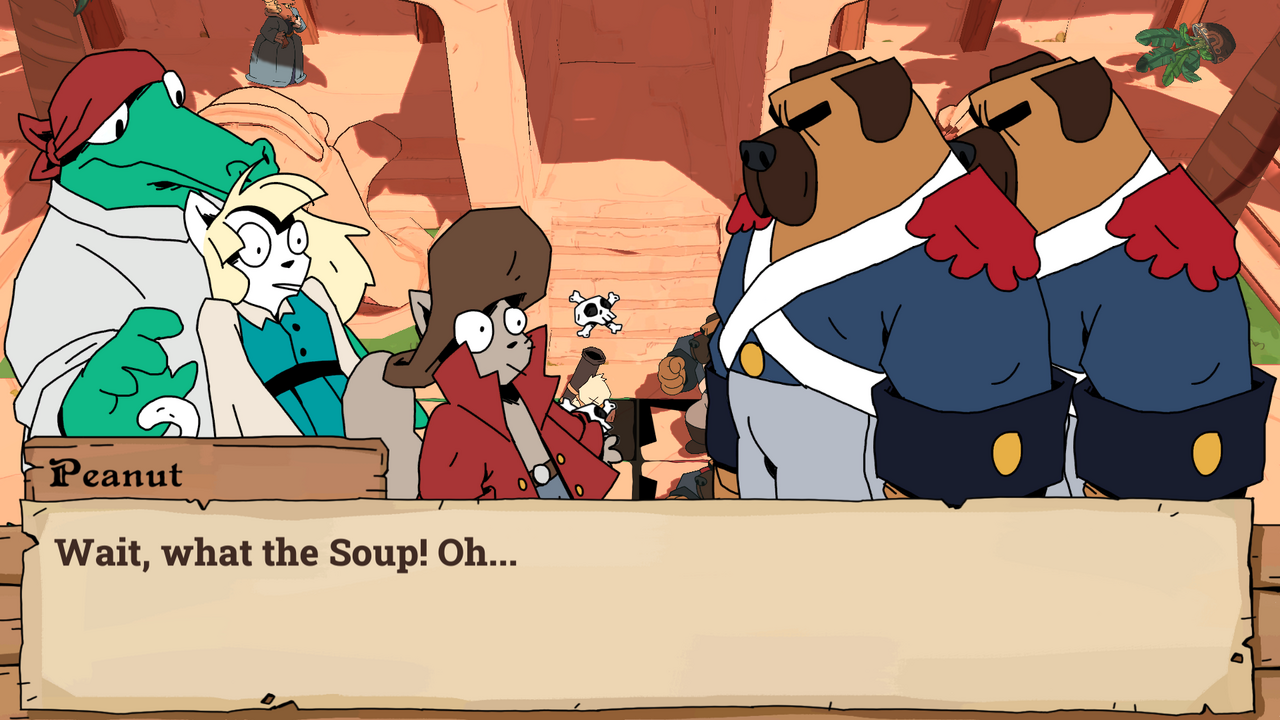
However, as production advanced, the intern’s tool became obsolete. I eventually took matters into my own hands and switched to Yarn Spinner, which is closer to writing dialogue as a program, with conditions and other logic. Its file format looks like this:
title: DocksPhilosophiesLore
---
WhiteFur: That's a painting of Rene Descarps,
    one of the most famous Philosofishes. #line:0063522
BlackWhiskers: I'm already bored...  #line:0b2d361
WhiteFur: "I sink, therefore I am." What an enlightened soul! #line:02a3da8
BlackWhiskers: Nobody cares... #line:0b46948
Krokoss: Actually, now I want to eat some fish! #line:01e0687
WhiteFur: Well, that's the problem with this world:
    people are more guided by their stomach, than their mind! #line:068f343
===
One major advantage is the line ID at the end of each line; this time, I also used each character’s full name to identify the speaker. Another advantage is the ability to put multiple dialogues in one file, whereas I had used a separate Ink file for each dialogue. Exporting all the .yarn scripts—the dialogue files—is straightforward, but Yarn Spinner normally runs them through its C# runtime. In the end, I wrote a simple interpreter for my use case.
Others
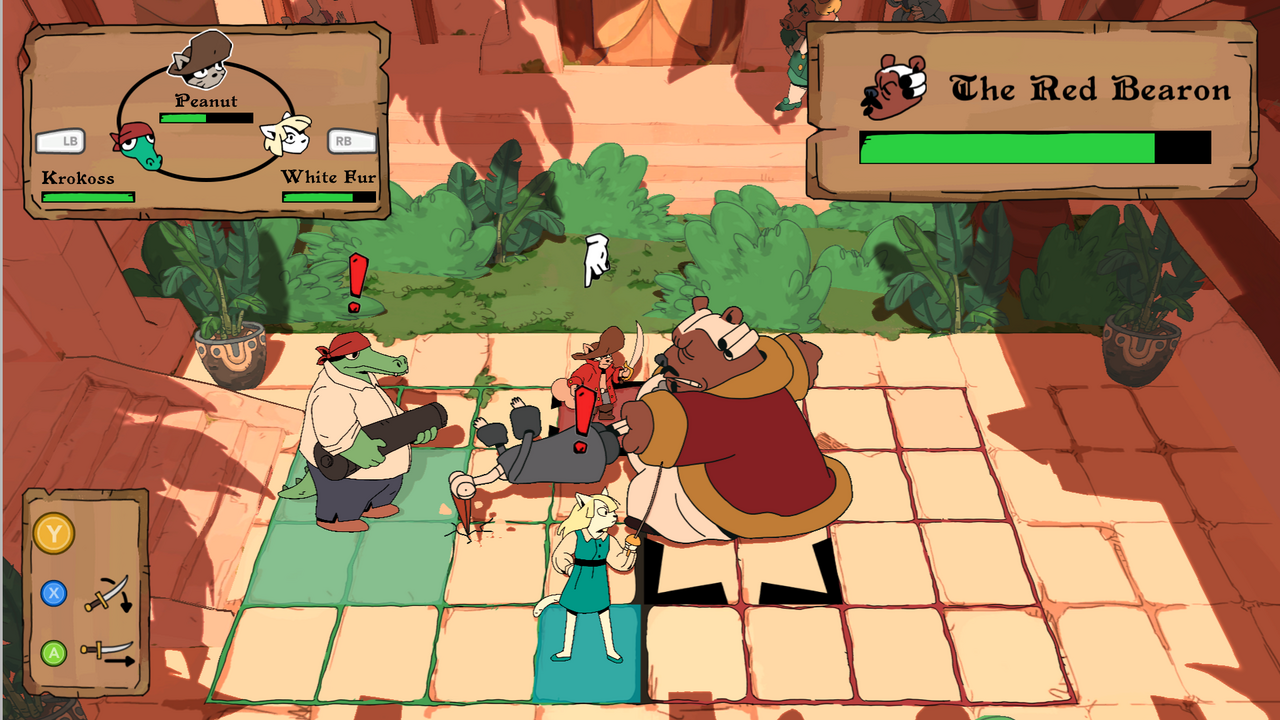
I have not covered the ground-battle migration in this blog post. It is a part of the game that relies heavily on 2D animation, with a UI layout that also needs to be exported. For animation, I can use the same technique as before and import the m_PPtrCurves from every animation clip used by the Animator. This allows me to identify all the textures needed to play those animations.
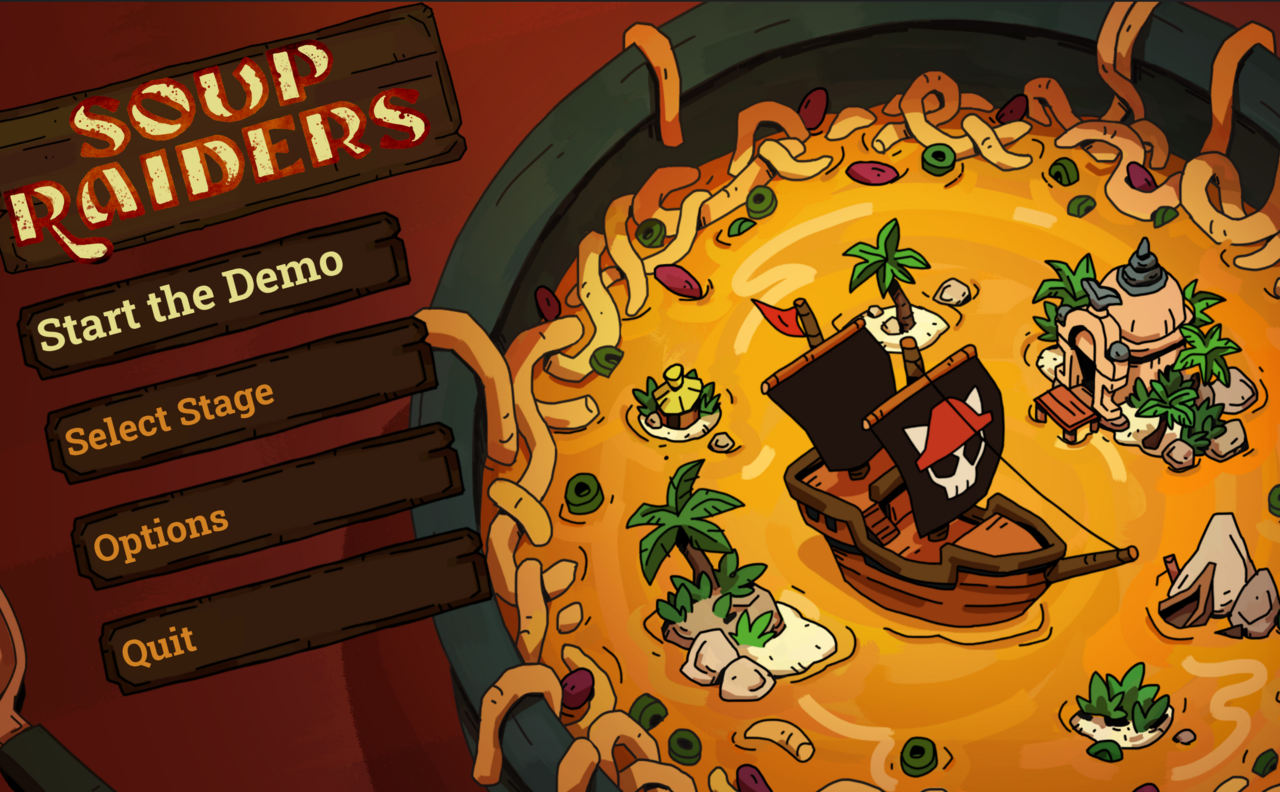
The title screen is fairly simple. Its UI layout is exported as JSON and the rest consists of images. However, it contains a large soup-boat animation made from 105 PNGs, which requires some processing by my engine’s asset compiler. That is a subject for the next blog post.
Conclusion
Porting a game may not be as difficult as starting again from scratch. When restarting a project, it can be tempting to delete everything and import every asset again by hand. I tried something different: because I may still use Unity as an editor, I made deliberate choices about how to export the assets I needed. This demo is substantial enough for the port to be non-trivial, but it is not a AAA game or a game whose executable must be reverse-engineered from another console architecture.
Now that I have all these assets, the next step is the asset compiler, which determines how the exported assets are imported into my game engine.
References
-
Noclip, Demon’s Souls: Remaking a PlayStation Classic, 12 July 2021. https://www.youtube.com/watch?v=hCBJ2fiiUXk ↩
-
Digital Foundry, Demon’s Souls Remake on PlayStation 5: The Digital Foundry Tech Review, 17 November 2020. https://www.youtube.com/watch?v=9O--CnN056E ↩
-
MURPHAGATOR!, Metal Wolf Chaos speedrun, Summer Games Done Quick 2014. https://www.youtube.com/watch?v=J1n0pVxS4sw ↩
-
Devolver Digital (@devolverdigital), post on X, 27 January 2016. https://x.com/devolverdigital/status/692330482176884736 ↩
-
General Arcade, Metal Wolf Chaos XD. https://more.generalarcade.com/projects/metal-wolf-chaos-xd/ ↩
-
Twilit Realm team, Dusklight is now available, 9 May 2026; updated 12 May 2026. https://twilitrealm.dev/posts/2026-05-09-dusk-v1-released/ ↩
-
ZeldaRET, The Legend of Zelda: Twilight Princess decompilation. https://github.com/zeldaret/tp ↩
-
encounter, decomp-toolkit: a GameCube and Wii decompilation toolkit. https://github.com/encounter/decomp-toolkit ↩
-
encounter, objdiff: a local diffing tool for decompilation projects. https://github.com/encounter/objdiff ↩
-
encounter, Aurora: a source-level GameCube and Wii compatibility layer. https://github.com/encounter/aurora ↩
-
Miguel Angel Horna, Postmortem: Porting Bastion to PSVita, Game Developer, 21 December 2015. https://www.gamedeveloper.com/programming/postmortem-porting-bastion-to-psvita ↩
-
Noel Berry, Making Video Games in 2025 (without an engine), 18 May 2025. https://noelberry.ca/posts/making_games_in_2025/ ↩
-
chsxf, Unity Built-in Shaders. https://github.com/chsxf/unity-built-in-shaders/tree/master ↩
-
NVIDIA, Cg Toolkit. https://developer.nvidia.com/cg-toolkit ↩
-
The Slang Project, Slang. https://shader-slang.org/ ↩